

Product Title
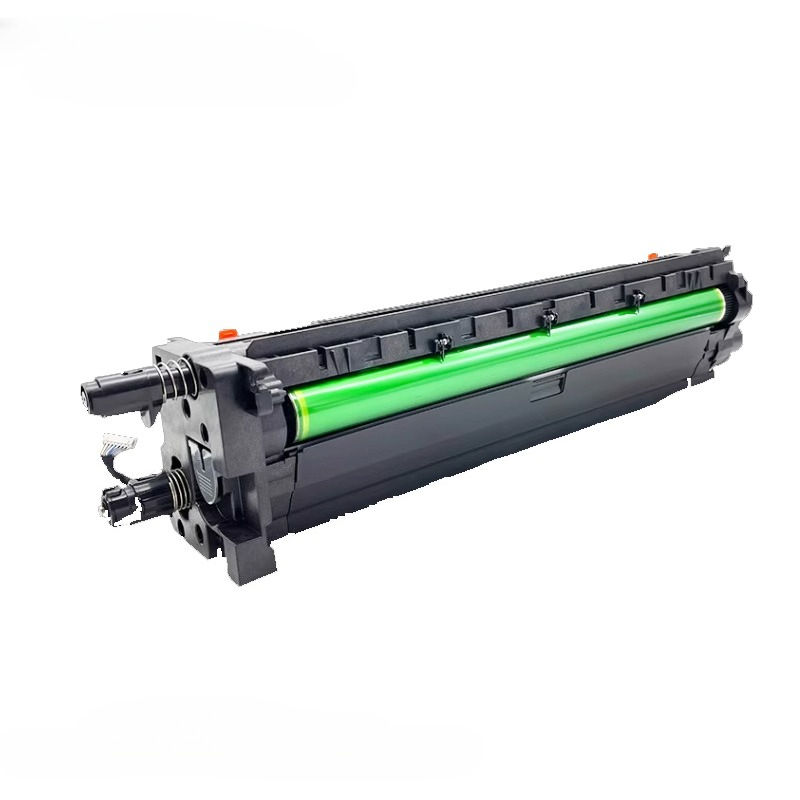
PCparts Compatible Imaging Drum Unit for HP LaserJet Managed MFP Series - Part Number W9066MC
Product Description
PCparts brand compatible imaging drum unit designed as a replacement for HP original part number W9066MC. This imaging drum is a critical component in HP LaserJet Managed series printers, responsible for transferring toner to paper during the printing process. While marketed as a compatible replacement, it's essential to verify specific printer model compatibility before purchase.
Important Compatibility Clarification
Based on available information, the W9066MC imaging drum is specifically designed for HP LaserJet Managed MFP E77822, E77825, and E77830 series printers.
For HP LaserJet Managed MFP E73130, E73135, and E73140 series printers, these models typically use different consumables:
-
Toner Cartridges: W9064MC (24,000 page yield) and W9065MC (48,000 page yield)
-
Imaging Drum: The specific drum unit part number for E73130/E73135/E73140 series may differ from W9066MC
Key Specifications
-
Part Number: W9066MC (HP OEM reference)
-
Component Type: Imaging Drum/Photoconductor Unit
-
Compatible Printer Series: HP LaserJet Managed MFP E77822, E77825, E77830
-
Function: Transfers toner to paper during the electrophotographic printing process
-
Replacement Indicator: Typically replaced when print quality degrades (streaks, spots, faded areas)
PCparts Brand Information
PCparts is a third-party manufacturer of compatible printer consumables and replacement parts. Their products are designed to offer cost-effective alternatives to original HP components while maintaining functional compatibility.
Printer Series Information
HP LaserJet Managed MFP E73130/E73135/E73140 Series:
-
Part of HP's Managed Flow MFP series
-
Latest firmware version: 5.8.8.1 (as of November 2024)
-
Available in standard (dn) and Flow (z) variants
HP LaserJet Managed MFP E77822/E77825/E77830 Series:
-
Color LaserJet Managed MFP models
-
Latest firmware version: 5.8.8.1 (as of November 2024)
Why Compatibility Matters
Using incorrect imaging drums can lead to:
-
Poor print quality
-
Printer damage or errors
-
Voided warranties
-
Reduced component lifespan
Verification Steps Before Purchase
-
Check Your Printer Model: Confirm exact printer model number
-
Verify Current Part Number: Check the part number on your existing imaging drum
-
Consult HP Documentation: Refer to HP's official parts catalog
-
Contact Supplier: Confirm compatibility with PCparts or your supplier
PCparts Quality Considerations
-
Compatibility Testing: Should undergo testing for specified printer models
-
Yield Performance: May have different page yield compared to original HP
-
Print Quality: Compatible drums may produce slightly different results
-
Warranty Coverage: Check PCparts' specific warranty terms
Installation Guidelines
-
Power Off: Turn off printer and disconnect power
-
Access Drum Unit: Open printer covers to access imaging drum compartment
-
Remove Old Drum: Carefully remove the exhausted imaging drum
-
Unpack New Drum: Remove all protective packaging from new PCparts drum
-
Install New Drum: Insert the new drum unit, ensuring proper alignment
-
Reset Counter: Follow printer instructions to reset drum counter if applicable
-
Test Print: Run test prints to verify installation and print quality
Common Issues with Compatible Drums
-
Compatibility Errors: Printer may not recognize non-OEM drums
-
Print Quality Variations: May differ from original HP quality
-
Yield Differences: Actual page yield may vary from specifications
-
Warranty Implications: May affect printer warranty coverage
Purchase Recommendations
-
Verify First: Double-check W9066MC compatibility with your specific printer model
-
Read Reviews: Check user feedback on PCparts W9066MC drum units
-
Compare Prices: Compare with other compatible brands and original HP
-
Check Return Policy: Ensure you can return if incompatible
-
Consider OEM: Original HP drums ensure optimal performance and warranty
Important Notes
-
Not for E73130/E73135/E73140: W9066MC appears incompatible with these models
-
Model Confirmation: Always verify your printer's exact model number
-
HP Support: For official compatibility information, consult HP support documentation
-
Professional Installation: Consider professional service for complex printer repairs
Summary
The PCparts W9066MC imaging drum is designed as a compatible replacement for HP LaserJet Managed MFP E77822, E77825, and E77830 series printers. It is not compatible with HP LaserJet Managed MFP E73130, E73135, and E73140 models, which use different consumable parts. Before purchasing any compatible imaging drum, always verify the exact part number compatibility with your specific printer model to avoid compatibility issues and ensure optimal print performance.