


Product Title:
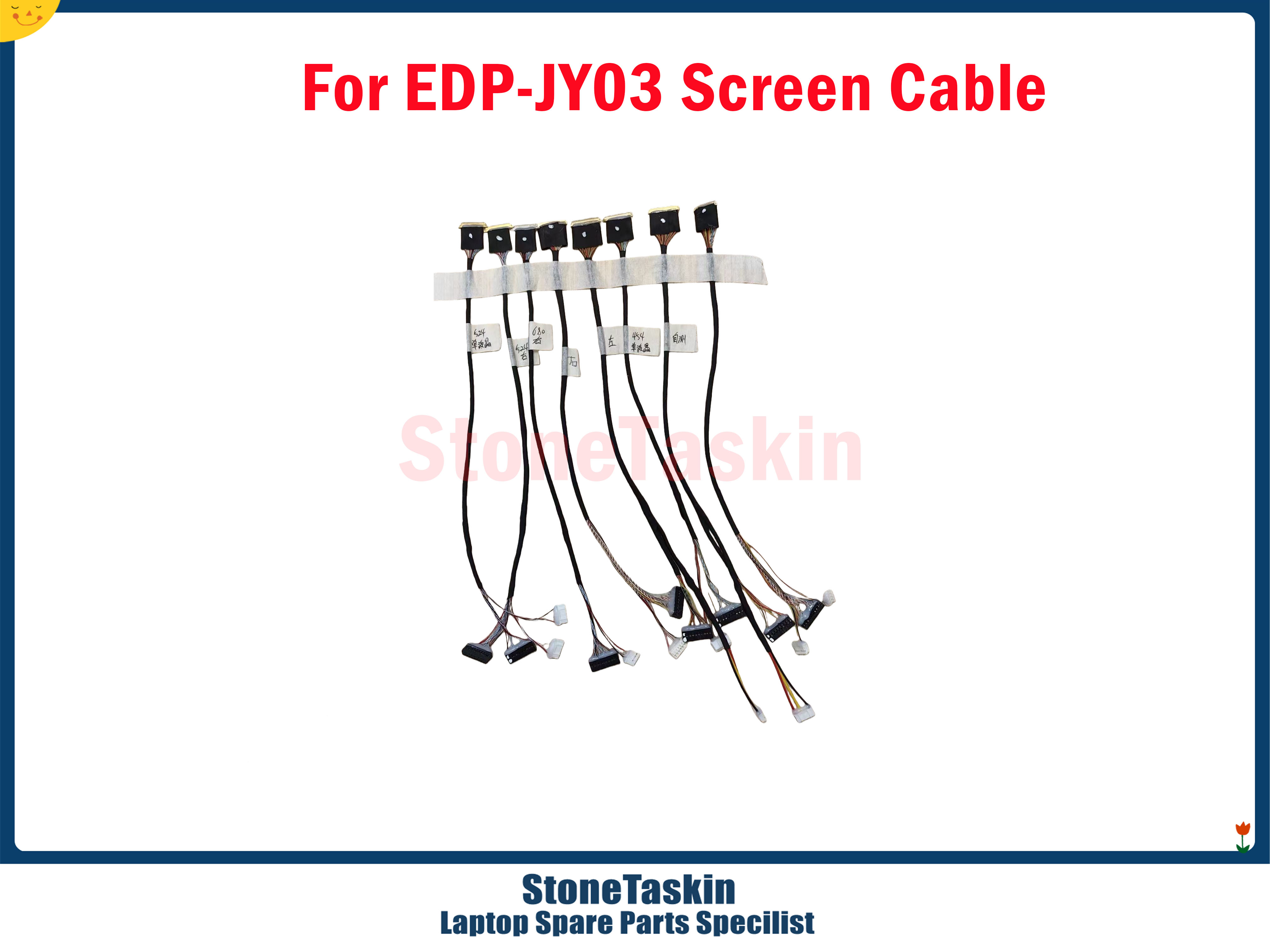
StoneTaskin LCD Screen Tester Cable / Breakout Adapter — For Laptop 4K 2K LVDS & eDP Panel Repair — Model EDP-JY03 Testing Instrument
Product Description:
This is a technician's diagnostic tool — an LCD panel test / breakout adapter cable (EDP-JY03) used to power and check bare laptop LCD panels without needing the original motherboard. It lets repair shops quickly determine whether a no-display / dim / artifact issue is caused by the panel itself, the eDP/LVDS screen cable, or the motherboard's video output — saving time and guesswork.
Unlike a "universal controller board" (which adds HDMI/VGA input), this is a powered breakout / tester harness: you plug it into the panel's eDP 30-pin or 40-pin (or LVDS 40-pin) connector, supply external power, and the panel either lights up the backlight / shows a basic test color pattern or remains dark — giving you an instant pass/fail verdict.
⚡ What This Tool Actually Does
|
Function |
Explanation |
|---|---|
|
Panel Alive Test |
Supplies the correct logic voltage (3.3V) and backlight power (up to 12V) to the panel so you can see if it lights up at all — even when the laptop motherboard is removed |
|
Cable Continuity Check |
By probing or observing behavior with the cable in-circuit, helps isolate bad eDP/LVDS cables (broken conductors, bent pins, crushed coax) |
|
No-PC Needed |
Works standalone — no PC, no HDMI source, no driver board required. Just the panel, this adapter, and a 12V supply |
|
Fast Triage |
Answer the #1 repair question in < 60 seconds: "Is the panel dead or is the motherboard/cable the problem?" |
📋 Core Specifications
|
Item |
Details |
|---|---|
|
Model / Label |
EDP-JY03 (also marked as eDP LVDS Panel Test Adapter / Repair Tool) |
|
Supported Interfaces |
eDP 30-pin · eDP 40-pin · LVDS 40-pin (via interchangeable harnesses / multi-position header) |
|
Resolution Rating (panel support) |
Up to 4K (3840×2160) / 2K (2560×1440 / 1920×1080) — limited by the panel's own capability, not this passive adapter |
|
Power Input |
Typically 12V DC barrel jack (5.5×2.1mm) or Micro-USB 5V (depends on batch — check photos) |
|
On-Board Regulation |
On-board regulator steps 12V → 3.3V logic for eDP/LVDS panel power |
|
Controls |
Power toggle switch · LED power indicator |
|
Included Harnesses (typical) |
1× eDP 30-pin FFC jumper · 1× eDP 40-pin FFC jumper · 1× LVDS 40-pin harness (config varies by shipment) |
|
Condition |
New third-party tool (sold by StoneTaskin) |
|
Warranty |
45 Days (seller-level, covers DOA / defective board on arrival) |
⚠️ Important: The "4K / 2K" in the title refers to the panel types it can test (eDP 30/40-pin panels used in 1080p/2K/4K laptops) — not that this device generates a 4K video signal. It does not convert HDMI to eDP. It is a powered test / breakout tool, not a controller board.
🔧 How To Use It (Basic Workflow)
Step 1 — Identify the Panel Connector
Look at the back of the LCD panel (once removed from the lid):
-
30-pin eDP → thin, 0.5mm pitch, common on slim 13–15″ panels
-
40-pin eDP → thicker, 0.5mm pitch, common on 15.6″+ 2K/4K panels
-
40-pin LVDS → older standard, wider ribbon, 1.0mm or 0.5mm pitch
Step 2 — Connect
-
Plug the correct FFC harness from the EDP-JY03 into the panel connector (align the pin-1 marking / notch)
-
Connect 12V DC power (or USB 5V depending on your unit)
-
Flip the power switch ON
Step 3 — Read the Result
|
Result |
Diagnosis |
|---|---|
|
Backlight lights up (white glow / dim light) |
Panel is getting power → panel itself may be OK; suspect cable or motherboard |
|
Backlight stays dark, no glow at all |
Could be blown backlight fuse on panel, bad LED driver path, or completely dead panel. Cross-check power pins with a multimeter |
|
LED on adapter stays off |
Check your 12V supply / polarity / switch |
|
You see faint image with flashlight test but no backlight |
Panel T-CON is alive → backlight circuit / fuse / LED string issue, not the LCD driver itself |
A Note on "Test Pattern"
Most basic EDP-JY03 breakout boards do not generate an actual video image — they just power the panel so you can verify the backlight and panel power rails. Some advanced versions include a tiny MCU that pushes a basic color-bar pattern via I²C; confirm from StoneTaskin's photos which variant you're getting.
📦 What You Typically Get in the Box
-
1× EDP-JY03 main test board (with power switch + LED + regulator)
-
1× eDP 30-pin FFC cable/harness
-
1× eDP 40-pin FFC cable/harness
-
1× LVDS 40-pin cable/harness (may be bundled or optional — confirm)
-
(Power supply is NOT always included — many listings ship board-only; have a 12V 2A DC adapter ready)
⚠️ Common Pitfalls (How People Break Panels With This)
|
Mistake |
Consequence |
|---|---|
|
Plugging in backwards (pin-1 reversed) |
Instant panel kill — eDP/LVDS pins carry power on specific lines; reverse = overvoltage on data lines |
|
Wrong pitch / wrong harness |
Bent pins, torn FFC socket on the panel |
|
Using a dirty / unstable 12V supply |
Voltage spikes can fry the panel's T-CON or backlight LED string |
|
Assuming "lights = good panel" |
A glowing backlight only proves power rails; actual image quality still needs a real video signal test (motherboard or HDMI→eDP controller board) |
🛡️ Safety Rule
Always double-check pin-1 alignment (there's usually a triangle / notch / copper-side marking on both the panel connector and the FFC cable). When in doubt, measure VCC-to-GND on the connector with a multimeter before flipping the switch.
✅ Who This Is For / Who It Isn't
|
✅ Great For |
❌ Not For |
|---|---|
|
Laptop repair shops doing volume screen triage |
End users wanting to "make a laptop screen into a monitor" (that needs a controller board, not this) |
|
Quickly proving panel-dead vs. cable bad |
Gaming / daily driving (this is a test tool, not a permanent driver) |
|
Testing panels pulled from dead laptops |
Absolute beginners — one reversed plug = dead panel |
💰 Bottom Line
The EDP-JY03 is a low-cost repair-shop triage tool (~$8–20 range typically) that pays for itself the first time it saves you from ordering a $80–150 replacement panel you didn't actually need. It's not a controller board, not a signal generator, and not plug-and-play safe for casual users — but in experienced hands it's genuinely useful.
If you want, tell me your panel's label / connector pin count (photo helps) and I'll confirm exactly which harness position and power setup your specific screen needs before you power it on.




Our purpose:Meet your demands,and make you smile.
Our advantage:1.High Quality 2.Reasonable Price 3.Stable Supplier
4.Rich Experience 5.Excellent Management Team