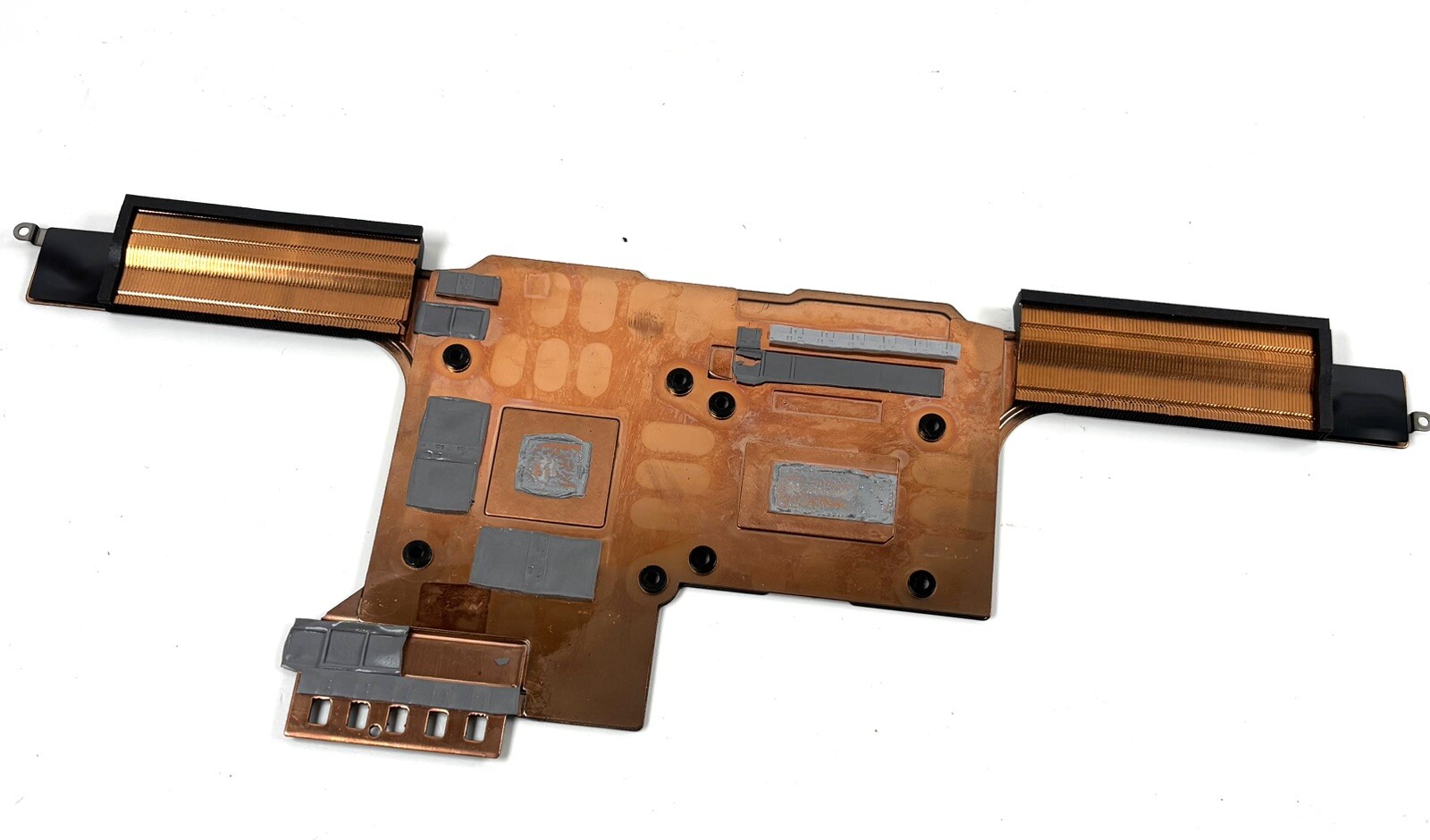



🔍 What This Part Actually Is
On the Razer Blade 15" (2023) — RZ09-0485x (product variants RZ09-0485Y / RZ09-0485Z), the thermal system is a custom vapor chamber cooling assembly — not a classic copper-heatpipe "heatsink block."
It's one integrated module consisting of:
|
Component |
Description |
|---|---|
|
Vapor chamber plate |
Thin, sealed flat chamber (filled with phase-change working fluid) that spreads CPU + GPU heat across the whole area |
|
Dual fan assemblies |
44-blade custom impellers pushing air through the fin stacks |
|
Fin / heat-exchanger stack |
Ultra-thin 0.1 mm fins along the left and right exhaust vents |
|
Mount hardware |
Spring-loaded captive screws, standoffs, thermal interface material (graphite/TIM pads) |
So when a listing says "Cooling / Heatsink / Thermal Heatsink CPU GPU Cooling" — they're selling the whole vapor-chamber + fan assembly (or sometimes the chamber alone, depending on variant). You need to read the listing photos carefully to see if fans are included or if it's just the chamber plate.
📋 Your RZ09-0485 Specs (for context)
|
Item |
Detail |
|---|---|
|
CPU |
i7-13800H (14C/20T, 2.5→5.2 GHz, 45W+ dynamic) |
|
GPU |
RTX 4060 8GB / RTX 4070 8GB GDDR6 |
|
Thermal |
Vapor chamber cooling (custom Razer CNC-fit) |
|
Chassis |
CNC aluminum, ~16.99 mm thick, 2.01 kg |
|
Power brick |
230 W |
⚠️ Before You Buy — The Most Important Question
Does your Blade 15 actually need a new vapor chamber — or just a repaste?
The #1 mistake buyers make with these listings is swapping a perfectly good (and expensive/fragile) vapor chamber when the real issue was:
|
Symptom |
Likely Cause |
Cheaper Fix |
|---|---|---|
|
Temps slowly climbed over 1–2 years, fans ramp loud |
Dried thermal paste + dust-packed fins |
Repaste CPU+GPU + compressed-air fin cleaning (PTM7950 phase-change pad recommended) |
|
One fan rattles / whines but temps OK |
Fan bearing failure — you may only need fan replacements, not whole chamber |
Source individual fan module (sometimes available separately) |
|
Hot spot on keyboard / GPU hotspot >95°C / throttling even after repaste |
Vapor chamber has lost working fluid (micro-leak) or internal delamination |
✅ This is when you need the full assembly |
|
Visible dent / bend in the vapor chamber plate |
Physical damage → chamber compromised |
✅ Replace |
If you haven't already: open the bottom cover, disconnect the battery, blow out the fin stacks, and do a proper PTM7950 (or high-end paste like Honeywell PTM7950 sheet / Thermal Grizzly Carbonaut) repaste first. That fixes ~70% of "my Blade is overheating" cases.
🛒 About This Specific Listing (StoneTaskin / "100% Tested / 45 Days")
StoneTaskin is a third-party salvage/pulled-parts reseller (operates on AliExpress and similar marketplaces). Here's what you're actually getting:
|
Factor |
Reality Check |
|---|---|
|
"Original" / "OEM" |
These are pulled from used/damaged donor machines — not new-old-stock Razer factory spares. Razer does not sell vapor chambers as a public consumer-replaceable part. |
|
"100% Tested" |
Means they spun the fans / checked continuity before pulling. It does not mean the vapor chamber's internal fluid charge is guaranteed long-term — micro-leaks only show under heat load. |
|
45-Day Warranty |
Seller-level only. Covers DOA / dead fan on arrival. Does not cover: you bending the chamber during install, snapping a fin, stripping a captive screw, or the chamber dying 3 months later. |
|
Included items |
⚠️ Read carefully. Some listings ship chamber-only (no fans). Some include fans. StoneTaskin photos should show exactly what's in the box — message them before buying to confirm. |
🔧 If You Do Replace It — Critical Install Warnings
The vapor chamber on a Blade 15 is extremely easy to destroy by accident:
-
Disconnect the battery FIRST — before touching anything else. The chamber sits right above live power rails.
-
The captive spring-screws have a specific tightening sequence — loosen and tighten in an X / cross pattern, gradually, in multiple passes. Never crank one corner down hard.
-
The vapor chamber plate is thin and brittle — pry only at designated tabs, never against the chamber face or fin stack. A bent chamber = trash.
-
You MUST replace the thermal interface material — the factory uses graphite/TIM sheets + paste. On reassembly use PTM7950 (phase-change sheet, best match to factory behavior) or high-end paste applied thinly.
-
Don't forget the tiny thermal pads on VRMs/VRAM/inductor areas — if those tear or shift, you'll cook voltage regulators even with "good" CPU/GPU temps.
-
Tools: You'll need Torx T5 for the bottom cover and likely Phillips #0 for internal screws. A plastic spudger and opening pick are mandatory.
iFixit has step-by-step Blade 15 fan/heatsink removal guides (the 2022 procedure is mechanically very similar to 2023 RZ09-0485 — same chassis family). Worth opening alongside your work.
✅ Pre-Purchase Verification Checklist
Before spending money on this:
-
Confirm your exact sub-model — look on the bottom cover for the sticker: it should read RZ09-0485Y or RZ09-0485Z (QHD 240Hz, i7-13800H, RTX 4060/4070). The vapor chamber is not cross-compatible with older RZ09-0421 (2022) or non-Blade-15 chassis.
-
Photo the existing assembly — count screw locations, note whether you need chamber+fans or just chamber.
-
Message StoneTaskin and ask explicitly:
-
"Does this include both fans or chamber-only?"
-
"Is this pulled from RZ09-0485 (2023) specifically, not 2022?"
-
"Can you show a photo of the actual unit with label/part marks visible?"
-
-
Pay via platform-protected checkout only (AliExpress Buyer Protection / PayPal G&S) — no direct transfer.
Bottom Line
The RZ09-0485 (2023) vapor chamber assembly is a precision CNC-fit part with no official Razer retail channel — so the used-pull market (StoneTaskin etc.) is where people go when Razer support declines out-of-warranty service. The 45-day "warranty" is a safety net for DOA only. Try a proper repaste + fin cleaning first — it's $20 of materials vs. $100–180+ for a pulled chamber. But if you've confirmed chamber failure (hotspot throttling post-repaste, visible damage, or fluid loss symptoms), then yes — this kind of listing is the only realistic path short of a full motherboard-swap donor board.