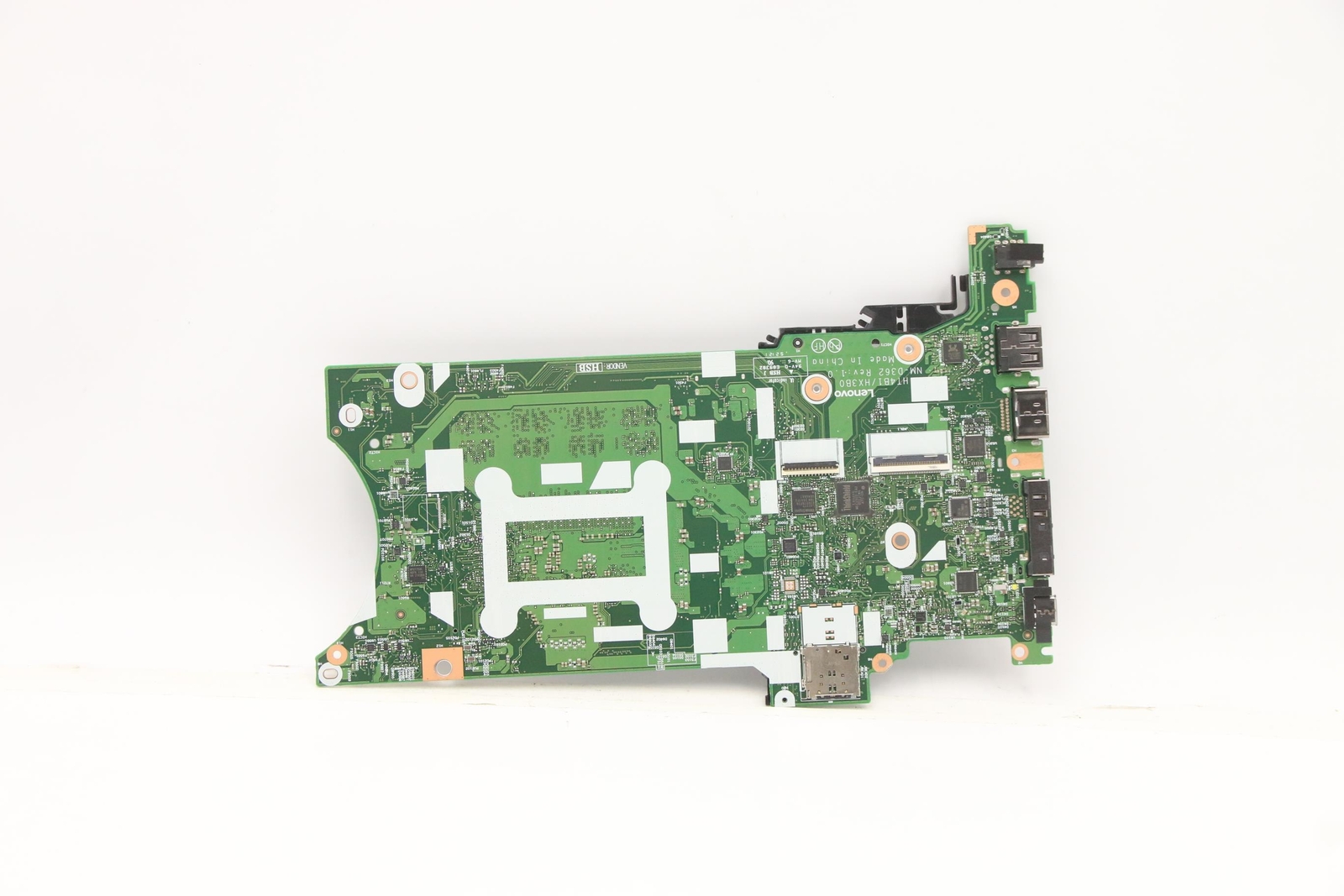


StoneTaskin 5B21H19892 For Lenovo T14S Gen 2 X13 Gen 2 Laptop Motherboard I7-1165G7 UMA 16G
Guaranteed Safe Checkout


StoneTaskin 5B21H19892 For Lenovo ThinkPad T14s Gen 2 / X13 Gen 2 Laptop Motherboard i7-1165G7 UMA 16GB 100% Tested 45 Days Warranty
Product Description:
This is a replacement system board (motherboard) for the Lenovo ThinkPad T14s Gen 2 and X13 Gen 2 (both 2021, Tiger Lake platform). The board carries Lenovo FRU 5B21H19892 and is equipped with a soldered Intel Core i7-1165G7 processor and 16GB onboard LPDDR4x memory, UMA (integrated Intel Iris Xe only, no discrete GPU). Sold by third-party supplier StoneTaskin, listed as 100% tested, with a 45-day seller warranty — not Lenovo factory warranty.
⚡ Core Specifications
|
Item |
Details |
|---|---|
|
Lenovo FRU |
5B21H19892 |
|
Compatible Models |
ThinkPad T14s Gen 2 — MT 20XK / 20XJ (Intel) |
|
Platform |
Tiger Lake-U (2021, 11th Gen Intel) |
|
Processor |
Intel Core i7-1165G7 (4C/8T, 2.8→4.7GHz, 15W, soldered BGA) |
|
Graphics |
UMA = Intel Iris Xe Graphics (integrated only — NO MX450 dGPU on this FRU) |
|
Memory |
16GB LPDDR4x-4266 — soldered/onboard, NOT upgradable |
|
Chipset |
Integrated in SoC (Tiger Lake-U has on-die PCH) |
|
Storage |
1× M.2 2280 — PCIe 4.0 x4 NVMe (SSD transfers from old board) |
|
Wireless (typical) |
Intel Wi-Fi 6E AX210 or AX201 (M.2 2230, may transfer or be included — confirm) |
|
WWAN |
M.2 3042 WWAN slot (optional, SIM tray on select trims) |
|
Key I/O (on board) |
2× Thunderbolt 4 (Type-C), 2× USB-A 3.2, HDMI 2.0, audio combo, side docking (T14s) / full mechanical dock (X13 Gen2 has both USB-C + mechanical dock lip) |
|
Condition |
Used / Pulled or Refurbished — 100% tested (per seller) |
|
Warranty |
45 Days — third-party (StoneTaskin), not Lenovo official |
⚠️ Critical Compatibility — Read Before You Buy
1) One FRU covers BOTH T14s Gen 2 and X13 Gen 2 (Intel only) — here's why
T14s Gen 2 (14″) and X13 Gen 2 (13.3″) share the same Tiger Lake Intel motherboard PCB — Lenovo designed them as a common platform with different lid/palmrest/form factor. So 5B21H19892 fits both:
|
Model |
MTM (Intel) |
Chassis |
|---|---|---|
|
T14s Gen 2 |
20XK / 20XJ |
14″, thinner, ~1.28kg |
|
X13 Gen 2 |
20XH / 20XW |
13.3″, smaller battery options |
✅ If your MTM is one of these four, this FRU is the correct one.
2) UMA vs dGPU — very important on T14s/X13 Gen 2
Tiger Lake T14s/X13 Gen 2 shipped in two graphics tiers:
-
UMA (Iris Xe only) → FRU family 5B21H19892 (this listing: i7-1165G7, 16GB)
-
dGPU (MX450 2GB) → Different FRU (5B21H1xxxx family, separate listing)
If your original board was the MX450 version, this UMA board will physically fit but you'll lose the discrete GPU — and the heatsink may not match (dGPU trim has a secondary heat pipe / contact on the MX450 die). Double-check your old board's FRU before ordering.
3) Not cross-compatible with Gen 1 or Gen 3
|
Generation |
Platform |
MTM Prefix |
Different FRU |
|---|---|---|---|
|
T14s / X13 Gen 1 (2020) |
Renoir / 10th-gen Ice Lake |
20UJ/20UK / 20UF/20UG |
❌ Not this FRU |
|
T14s / X13 Gen 2 (2021) |
Tiger Lake-U |
20XK/20XJ / 20XH/20XW |
✅ This FRU |
|
T14s / X13 Gen 3 (2022) |
Alder Lake-P (12th gen) |
21BS/21BT / 21BN/21BQ |
❌ Not this FRU |
Confirm your bottom-label MTM starts with 20XK / 20XJ / 20XH / 20XW — that's the only safe match.
4) Memory is soldered — 16GB is ALL you get
This board has 16GB LPDDR4x-4266 soldered, no SO-DIMM slots (T14s/X13 Gen2 Intel both went fully soldered for the Tiger Lake trim). If your old board was 32GB, this 16GB unit is a downgrade — Lenovo offered 8G/16G/32G onboard tiers on this FRU family. Make sure 16GB matches your need.
🔧 Installation Difficulty: High (Business Ultrabook Full Strip)
T14s Gen 2 / X13 Gen 2 are both internal-battery + glued-antenna + TrackPoint-ribbon rigs. From Lenovo HMM:
-
Bottom cover off → disconnect battery FIRST (critical — Thunderbolt controller is live)
-
Remove: SSD, WWAN (if equipped), WLAN, heatsink/fan, speaker, NFC/smart card, fingerprint
-
Disconnect: keyboard ribbon (T14s has the keyboard from the top, X13 similar), TrackPoint/zoom ribbons, display eDP + antenna coax
-
Unbolt motherboard (captive screws, numeric order)
-
Reverse with your SSD/RAM-not-applicable(Wifi transfers) + fresh thermal paste on CPU die
Common Kill Points on This Swap
|
Mistake |
Consequence |
|---|---|
|
Battery not disconnected before unplugging eDP/Thunderbolt |
Thunderbolt controller (integrated in TGL SoC) can be permanently killed by hot-plug |
|
Forgetting which M.2 screw length |
T14s/X13 use mixed M2 screw lengths — long screw in wrong hole punches the board |
|
Antenna coax snapped |
AX210/AX201 coax on these are thin — X13 Gen2's smaller lid makes routing tighter |
|
UMA heatsink on dGPU board or vice versa |
If your old machine had MX450, the UMA heatsink won't contact the dGPU die (if going dGPU→UMA, the secondary contact just hangs — ok, but wasted) |
📦 What You Transfer / What's On-Board
|
✅ On this board |
🔄 Transfer from old |
|---|---|
|
i7-1165G7 (soldered) |
M.2 NVMe SSD |
|
16GB LPDDR4x (soldered) |
WLAN card (usually AX210/AX201 M.2) |
|
All ports, TB4 controllers, BIOS |
WWAN card (if equipped) |
|
Embedded Controller / TPM |
Heatsink + fan (reuse yours + fresh paste) |
|
All antenna cables, keyboard, battery |
🛡️ Warranty / Seller Note
-
45 days = seller-level only (StoneTaskin) — covers DOA / no-power / obvious short after careful install
-
Not covered: ripped ZIF ribbons, snapped coax, burnt board from reused swollen battery, liquid history, bent pins
-
Pay via platform-protected checkout (AliExpress/Ebay/PayPal G&S) — no bank transfer
-
Upon arrival: photo the board label (5B21H19892 + S/N) before install
✅ Pre-Purchase Checklist
-
Confirm MTM =
20XK/20XJ(T14s G2) or20XH/20XW(X13 G2) on bottom sticker -
Confirm your old board FRU =
5B21H19892(i7/UMA/16G) — not the dGPU (MX450) variant, not the 32GB variant -
Confirm memory tier — this is 16GB soldered; if you need 32GB, this is the wrong SKU
-
Confirm UMA vs dGPU — if your old machine had MX450, think twice: this UMA board will work but you lose dGPU + heatsink mismatch possible
-
Diagnose first — T14s Gen2/X13 Gen2 common faults: USB-C PD controller (no charge), TB4 port flaky, not always main board
Bottom line: 5B21H19892 is the correct FRU for T14s Gen 2 (20XK/20XJ) and X13 Gen 2 (20XH/20XW) Intel — i7-1165G7 / UMA / 16GB onboard. It's a used/pulled third-party part, 45-day seller cover only. The gotchas are: UMA vs dGPU FRU split, 16GB soldered (no upgrade), and Tiger Lake TB4 is fragile if you hot-plug during swap. If you paste your MTM, I'll confirm whether this exact FRU matches your machine or whether you need the 32GB or dGPU variant instead.