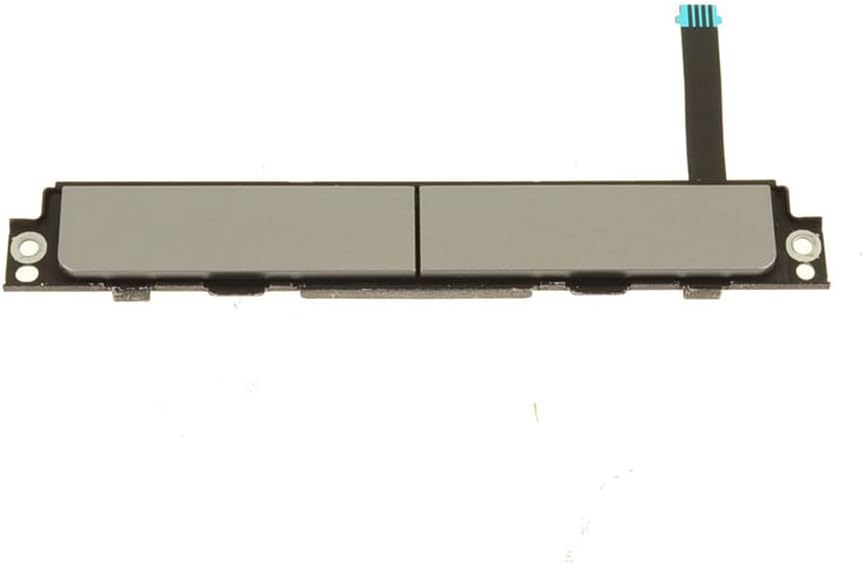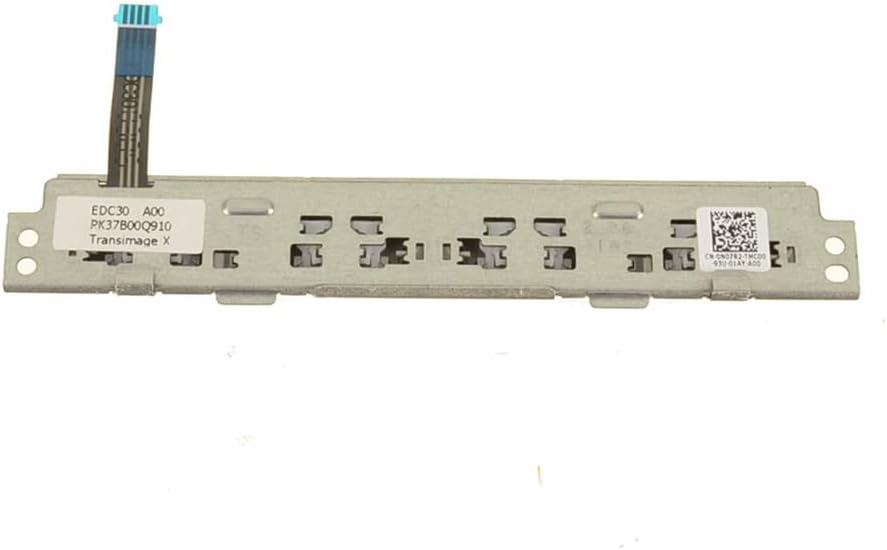


StoneTaskin New Laptop Touchpad Mouse Button Board For Dell Latitude 7300 / Latitude 7400 — 0N07R2 / N07R2 / EDC30 / PK37B00Q910 — Silver — 45 Days Warranty
Product Description:
This is a replacement touchpad mouse button board (click-button sub-board) for the Dell Latitude 7300 (13″) and Latitude 7400 (14″) business ultrabooks. The part carries Dell P/N 0N07R2 (also written N07R2) with supplier references EDC30 / PK37B00Q910, and comes in the Silver finish to match silver palmrest configurations. Sold by third-party supplier StoneTaskin, new condition, with a 45-day seller warranty (not Dell factory).
⚡ Core Specifications
|
Item |
Details |
|---|---|
|
Dell P/N |
0N07R2 (short form: N07R2) |
|
Alt References |
EDC30 · PK37B00Q910 (module / supplier codes) |
|
Compatible Models |
Dell Latitude 7300 (13.3″, MTM 0KT93H / etc.) |
|
Function |
Physical left / right click buttons that sit abovethe precision touchpad (Latitudes 7300/7400 retain the classic "button bar" for TrackPoint use) |
|
Interface |
Small ZIF ribbon to the main touchpad / palmrest assembly |
|
Color |
Silver (matches silver palmrest trims — black also exists on some listings; confirm your machine) |
|
Condition |
New third-party (StoneTaskin) |
|
Warranty |
45 Days — seller-level, not Dell official |
📌 Note: On Latitude 7300/7400, the actual touch surface is the large precision touchpad below, but Dell kept the three-button (L/M/R) cluster above for TrackPoint ("nub mouse") users. This board is that button cluster PCB, not the touch-sensing pad itself.
🔍 Compatibility Details
Why 7300 and 7400 share this part
Both machines are the same chassis family:
-
Latitude 7300 = 13.3″ version (MTM family ~0KT93H)
-
Latitude 7400 = 14″ version (MTM family ~04KP0T)
Internally, the palmrest + button board area is near-identical — Dell uses shared internal SPs across the 13″/14″ pair. So 0N07R2 covers both.
Color check — important
The same functional board ships in Silver and Black to match the two palmrest colorways Dell offered:
-
Your palmrest's top surface (around the buttons) must match — silver button board into a black palmrest will look wrong (and vice versa), though electrically it'll still work.
-
If your machine is the black palmrest config, you need the black variant of this board (different listing — check before ordering).
🛠️ What Fails on These Button Boards (Why You're Buying)
|
Symptom |
Likely Cause |
|---|---|
|
Left / right click physically mushy or no tactile feel |
Rubber dome / plastic hinge under the button bar worn or cracked (common after 3–4 years of heavy TrackPoint use) |
|
Click registers double / chatter |
Micro-switch wear on the button PCB |
|
One button completely dead, TrackPoint moves fine |
Flex damage at the ZIF tail, or cracked PCB near the mount |
|
Physical crack at button bar edge |
Drop impact — Latitude 7000 lids/palmrests are magnesium-reinforced but the button bar overlay is thin plastic |
🔧 Installation Difficulty: Medium-High (Palmrest-Level Disassembly)
On Latitude 7300/7400, the button board sits on top of the touchpad, integrated into the palmrest assembly. To swap it, you're effectively going into the top case:
From Dell's HMM flow:
-
Bottom cover off → disconnect battery (critical — live rails around the touchpad area)
-
Remove keyboard (Latitudes 7300/7400 use the "keyboard from front" method — release tabs at top edge of keyboard, lift slightly, disconnect ZIF)
-
Remove palmrest / top assembly — this involves unplugging:
-
TrackPoint/ZIF ribbons
-
Touchpad ZIF
-
Button board ZIF (tiny — easy to tear)
-
Smart card / NFC / fingerprint modules (if equipped)
-
Speaker cables
-
WWAN/WLAN antenna coax (routed through palmrest)
-
-
Button board itself — usually held by a couple of tiny Phillips screws + plastic clips onto the palmrest; the ZIF tail goes to the touchpad mainboard or palmrest sub-PCB
-
Transfer the old button board out, mount the new StoneTaskin unit, reverse
Common 7300/7400 Pitfalls
|
Mistake |
Consequence |
|---|---|
|
Forgetting battery disconnect |
Short on the touchpad rail → kills the new button board instantly |
|
Tearing the button board ZIF tail |
It's ~0.5mm pitch, very fragile — lift the latch, don't pull |
|
Mix-up with the touchpad itself |
This listing is the button bar PCB only, NOT the main touchpad sensor — if your issue is "cursor drifts / no pointer," that's the touchpad, not this board |
|
Color mismatch |
Silver board into black palmrest looks odd (works electrically, but cosmetic fail for a business machine) |
|
Not re-seating TrackPoint ribbon |
After reassembling, TrackPoint dead even though buttons work — check the ribbon under the keyboard |
💡 Pro tip: On these Latitudes, if both TrackPoint + buttons are dead but the touchpad glides fine, the fault is usually the ribbon between keyboard and palmrest, not this button board. Diagnose before buying.
📦 Package Contents (Typical)
-
1× Touchpad Mouse Button Board (0N07R2 / N07R2 / EDC30 / PK37B00Q910) — Silver
-
(Screws usually transfer from old — confirm with seller whether any included)
Touchpad sensor, palmrest, keyboard, TrackPoint cap, ribbon cables = NOT included.
✅ Pre-Purchase Checklist
-
Confirm model = Latitude 7300 or 7400 (check bottom label MTM)
-
Confirm color — palmrest is Silver (if yours is Black, this SKU is wrong cosmetic-wise)
-
Diagnose symptom — is it actuallythe button board?
-
Buttons mushy / cracked / dead clicks → ✅ this board
-
Cursor drift / no pointer / jitter → ❌ that's the main touchpad, not this
-
TrackPoint doesn't move but buttons click → ❌ likely keyboard ribbon or TrackPoint module, not this
-
-
Check your old board's P/N — flip the palmrest over (once out) and look for
0N07R2/N07R2printed on the button PCB
💰 Bottom Line
StoneTaskin's 0N07R2 / N07R2 button board is the correct replacement for the TrackPoint button bar on Latitude 7300 & 7400 (Silver trim). It's a small, inexpensive part (~$12–28 range typically), but the labor to get to it is the real cost — you're basically stripping the top half of the laptop. If you're already in there for a palmrest swap or keyboard job, it's a cheap "while-you're-in-there" fix. If you're opening justfor this, weigh the labor vs. a full palmrest assembly (which sometimes includes the button board pre-mounted).
If you want, paste your Latitude's MTM (e.g., 0KT93H / 04KP0T) and I'll confirm whether your machine uses the silver or black variant of this button board and whether any palmrest-bundle SKU might be a cleaner buy.